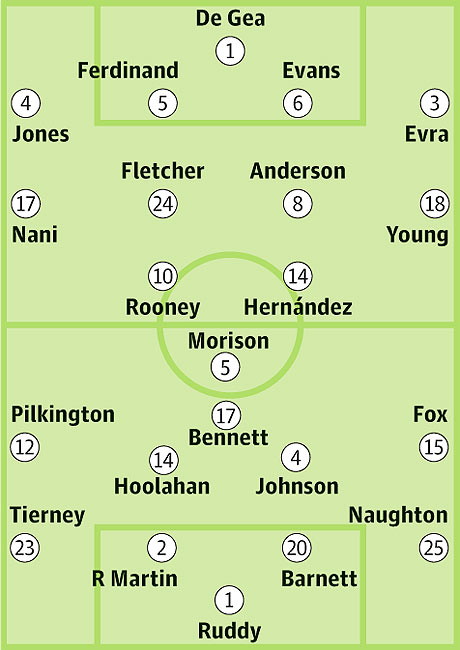
-Latest roster.
-Latest kits.
-Latest minikits.
-All minifaces.
-A lot of faces.
-New adboards.
-New flags.
-New ball.
-New logos and banner.
ENJOY!
http://www.mediafire.com/?cvct2njnzn9td2n
Thanks for visting!
Go to Blogger edit html and find these sentences.Now replace these sentences with your own descriptions.This theme is Bloggerized by Lasantha Bandara - Premiumbloggertemplates.com.

Audio grabber for audio CDs (more infos) without installation.
Download Portable EAC (5.3 MB)
Extract and run EACPortable.
Edit EACPortable.ini to set External Encoder with Default Settings:
ExternalEncoder=FLAC (1.2.1)
ExternalEncoder=LAME (3.98.4)
ExternalEncoder=Ogg (2.87)
ExternalEncoder=APE (4.10)
ExternalEncoder=Custom to keep personal settings for encoder
Settings of installed EAC should be preserved.

Manage, troubleshoot and diagnose your Windows systems and applications without installation.
Download Portable Sysinternals Utilities Online (0.8 MB)
Installer will download latest version of selected utilities:
AccessEnum,
ADExplorer,
ADInsight,
Autoruns,
BgInfo,
CacheSet,
DebugView,
Disk2vhd,
DiskMon,
DiskView,
LoadOrder,
PageDefrag,
PortMon,
ProcessExplorer,
ProcessMonitor,
RAMMap,
ShareEnum,
TCPView,
VMMap,
WinObj,
ZoomIt.
Installer run as update: Utilities found in PortableApps folder are checked by default.
Extract and run *Portable.
Settings of installed Sysinternals Utilities should be preserved.

Translate in one click without installation.
Download Portable Babylon (2.4 MB)
Extract and run BabylonPortable.
Don't forget to close Babylon before leaving Windows : right-click on icon, Exit.
Not Thinstalled, so you can translate a word with choosed click of the mouse.
Interface language set by launcher with localization of Windows (English, Arabic, SimpChinese, TradChinese, Dutch, French, German, Hebrew, Italian, Japanese, Korean, Portuguese, Russian, Spanish, Swedish, Turkish).
To set language yourself, write SystemLang=false in BabylonPortable.ini.
To add dictionaries:
Download Offline Dictionary (SFX Zip exe).
Extract .BGL file with 7-Zip, WinRAR or WinZip (right-click on exe).
Drag'n'drop .BGL file on BabylonPortable.exe (not running).